
Download Shareworks APK – Manage Your Portfolio on the Go
Overview
Shareworks is a dedicated mobile application designed to support employees in managing their equity compensation portfolios from a smartphone or tablet. Developed by Solium, the app operates within the Business & Productivity category, specifically targeting the Finance sub-sector. Its primary function is to provide users with real-time access to their employee stock purchase plan (ESPP) holdings, stock options, and restricted stock awards (RSAs). The app enables users to track both past and upcoming events related to their equity, including vesting dates, exercise deadlines, and transaction histories. It also supports actions such as exercising options, selling shares, and transferring holdings, all from a mobile interface.
Shareworks is tailored for employees who participate in equity-based compensation programs and require a convenient way to monitor and manage their financial assets without relying on desktop systems. It is especially useful for individuals with complex equity portfolios who need timely updates and planning tools. The app integrates securely with the user’s existing Shareworks account, which must be activated through the Solium website. While the app does not provide investment advice or financial planning tools, it serves as a streamlined interface for portfolio visibility and transaction execution. The developer did not provide additional details about the app’s development background beyond its association with Solium.
Key Features & Capabilities
- Portfolio Tracking – View current holdings across stock options, restricted stock awards, and ESPP plans in one centralized dashboard.
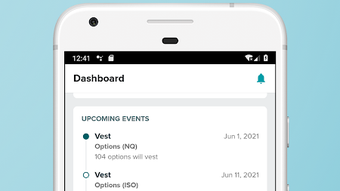
- Event Calendar – Access a timeline of upcoming and past events, including vesting dates, exercise windows, and dividend distributions.
- Transaction History – Review all completed transactions, including share purchases, sales, and transfers, with detailed records.
- Equity Actions – Execute key actions such as exercising options, selling shares, or transferring ownership directly from the app.
- Portfolio Forecasting – Estimate future portfolio value based on current holdings and projected market movements.
- Secure Authentication – Sign in using fingerprint (Android 6.0+ on supported devices) for enhanced access security.
These features are designed to empower employees to make informed decisions about their equity compensation. For example, a user can review their upcoming RSA vesting date, assess their current holdings, and initiate a sale or transfer with just a few taps. The forecasting tool helps users anticipate tax implications and liquidity events.
All data is synchronized with the backend system, ensuring consistency across devices. The app does not store financial data locally, reducing the risk of exposure in case of device loss. This makes it suitable for professionals managing sensitive equity portfolios on mobile devices.
User Interface, Workflow & Performance
The user interface of Shareworks is structured to prioritize clarity and ease of navigation. The main dashboard presents key portfolio metrics, such as total value and recent activity, in a clean, minimalist layout. Navigation is handled through a bottom tab bar, with access to sections like Portfolio, Events, Transactions, and Actions. The workflow is linear and intuitive, guiding users through steps required to complete equity-related tasks, such as selecting a stock option and confirming an exercise.
Given that the app is built for mobile use, the design adapts to different screen sizes and orientations. Interaction elements are appropriately sized for touch input, minimizing errors during data entry or confirmation. The developer did not specify resource usage details, so exact performance behavior in terms of CPU or RAM consumption remains unknown.
However, based on general mobile application patterns, the app likely maintains low background activity to preserve battery life. Stability appears to be consistent, as the app functions within a secure, authenticated environment. No reports of crashes or freezes were provided, and the app relies on server-side processing for data retrieval, which reduces local strain.
Compatibility & System Requirements
Shareworks is available as an Android application, compatible with devices running Android 6.0 (Marshmallow) or later. The app is distributed through the Google Play Store and does not require sideloading. Installation size is not specified, but typical finance apps of this nature range between 20–50 MB.
The developer did not provide exact system requirements beyond the OS version. Hardware requirements, such as minimum RAM or processor speed, were not listed. Compatibility information was partially provided, with no mention of iOS or other platforms.
Pros and Cons
Pros
- Free to download and use with no in-app purchases
- Secure access with fingerprint authentication (Android 6.0+)
- Real-time portfolio and event tracking
- Supports key equity actions directly from mobile
- No financial data stored on the device
- Simple, intuitive interface tailored for non-financial users
Cons
- Requires an existing Shareworks account (not available for new users without prior setup)
- Only available for Android; no iOS version disclosed
- Limited to users with equity compensation plans through Solium
- No offline access to portfolio data
- Dependent on internet connectivity for all functions
FAQ Section
Is Shareworks available for iOS devices?
The app is currently only available for Android. No information was provided about an iOS version.
Is the app safe to use?
Yes, the app uses encrypted communication and does not store financial data on the device. All data is transmitted securely to the backend system.
How do I get started with Shareworks?
You must first activate a Shareworks account via the Solium website. The app requires an active account to function.
Can I use Shareworks without an internet connection?
No, the app requires an active internet connection to access portfolio data, execute transactions, or view events.
Does Shareworks offer investment advice?
No, the app does not provide financial or investment recommendations. It is a tool for managing equity compensation, not for making investment decisions.
Final Thoughts
Shareworks delivers a focused, secure, and efficient mobile experience for employees managing equity compensation. Its clean interface, real-time tracking, and ability to execute key actions from a smartphone make it a valuable tool for professionals with stock options and restricted stock awards. While limited to Android and requiring an existing account, it fills a critical gap in mobile portfolio management for a specific user base.
The app’s emphasis on security and data privacy further enhances its credibility. For employees with equity plans through Solium, Shareworks is a must-have utility. Download Shareworks now.







